Back around 2018 on my old www.frot.co.nz blog I used to get over 1000 hits most days, and would get up over 2000 hits on good days too.
But since the start of the covidhoax in 2020, when I began regularly calling out the whole scam, it's safe to say that my www.frot.co.nz blog hits took a hammering and never recovered.
For the past two years I've wondered if my new www.sift.co.nz blog would ever get up over 2000 hits a day.
The hits this year have been gradually increasing, and yesterday they finally exceeded 2000 for the first time.
So that's pretty cool. And it's not like I've stopped calling out the covidhoax or the death jabs or anything.
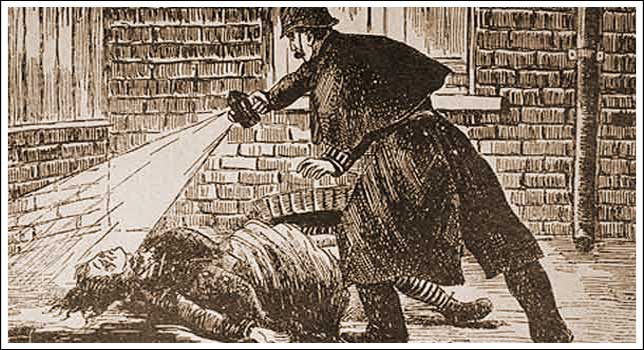
A serial killer ritually murders London prostitutes in order to cover up a scandal involving the British Royal family
The Masonic conspiracy rests on the testimony of Joseph Sickert, son
of painter Walter Sickert who was allegedly involved in the conspiracy
along with the Queen’s personal physician, Sir William Gull (aged 72!),
police commissioner Sir Charles Warren and other high-level Freemasons.
In Sickert’s tale, Queen Victoria’s grandson and heir apparent Prince
Eddy, Duke of Clarence had married and fathered a child with a common
Irish Catholic shop clerk from London’s East End. With the entire
monarchy’s fragile state and a Catholic bastard now standing in line for
the throne, the Freemasons were charged with cleaning up the mess and
eliminating all witnesses. Sickert had the role of playing the Duke’s
brother on his outings and suspiciously was not himself of a target of
the Masonic hit squad, leading some to believe that Walter Sickert himself might be Jack the Ripper or at the very least, one of his accomplice. (There are currently over 100 suspects in the Whitechapel Murders).
In 1976, Stephen Knight wrote Jack the Ripper. The final solution,
a bestselling book based on Sickert’s account. Sickert admitted to the
Royal Conspiracy hoax in The Sunday Times of London in 1978. Despite
the admission, the story remained popular and spawned a myriad of
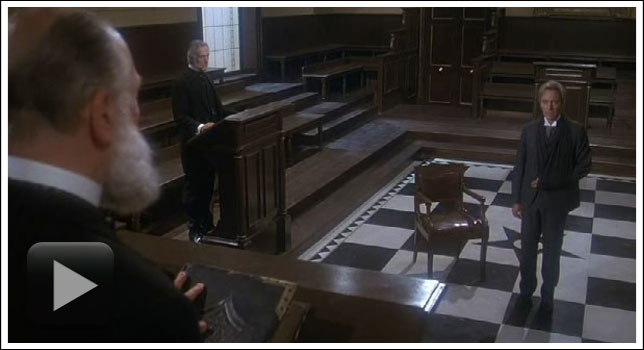
articles, books and movies including the big-budget 2001 film From Hell (based on the Alan Moore’s graphic novel by the same name), the 1979 Murder by Decree (famous for depicting actual secret Masonic grips) and a host of other movies.
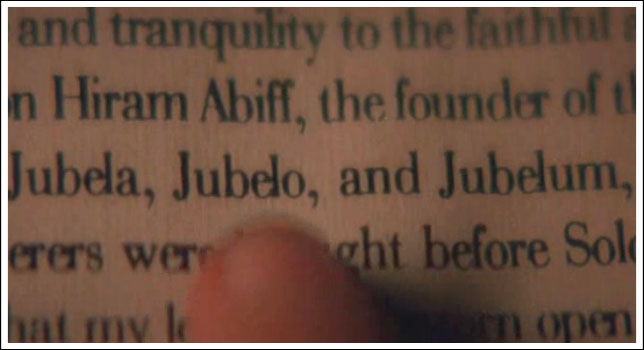
The words “The Juwes are the men that will not be blamed for nothing.” (see the Goulston Street Graffito)
were found scribbled in chalk near the double-murder scenes of victims
Stride and Eddowes. Sir Charles Warren, head of the London Police and
the Most Worshipful Master of the Quator Coronati Masonic Lodge erased
the reference to “juwes” left behind by Jack the Ripper. Ostensibly, to
avoid a backlash against the local Jewish population. Conspiracists
point out that the unusual spelling of “Juwes” is a reference to the
Masonic murder of Hiram Abiff by the three ruffians Jubela, Jubelo and
Jubelum.
Due to the lack of forensic evidence, it’s impossible to completely
rule out the masons as the culprit behind the Jack the Ripper killings.
However, there really isn’t any reason to do so. Some evidence does pop
up once in a while, for instance author Patricia Cornwell’s research
into DNA proved that at least one of the letters attributed to Jack the
Ripper was written by Walter Sickert.
Parallels between the Ripper murders and Masonic Oaths:
All “Canonical 5” victims had their throat cut from left to right. (See
Entered Apprentice Oath below) The fifth victim’s heart was taken. (See
Fellowcraft Oath below) Four of the victims abdomen were slashed with
Kelly’s completely emptied. (See Master Mason Oath below) Knight claims
that Jack the Ripper’s murders paralleled Masonic blood oaths. (see
below)
Oath of an Entered Apprentice:
“All this I most solemnly, sincerely
promise and swear, with a firm and steadfast resolution to perform the
same, without any mental reservation or secret evasion of mind whatever,
binding myself under no less penalty than that of having my throat cut across,
my tongue torn out by its roots, and my body buried in the rough sands
of the sea, at low-water mark, where the tide ebbs and flows twice in
twenty-four hours, should I ever knowingly violate this my Entered
Apprentice obligation. So help me God, and keep me steadfast in the due
performance of the same.”
Oath of a Fellowcraft
“All this I most solemnly promise and
swear with a firm and steadfast resolution to perform the same, without
any hesitation, mental reservation, or self-evasion of mind whatever,
binding myself under no less penalty than of having my breast torn open my heart plucked out,
and placed on the highest pinnacle of the temple, there to be devoured
by the vultures of the air, should I ever knowingly violate the Fellow
Craft obligation. So help me God, and keep me steadfast in the due
performance of the same.
(some say, My heart and vitals taken from thence, and thrown over my
left shoulder, and carried into the valley of Jehoshaphat…)”
Oath of a Master Mason
“All this I most solemnly, sincerely
promise and swear, with a firm and steady resolution to perform the
same, without any hesitation, mental reservation, or secret evasion of
mind what-ever, binding myself, under no less penalty than that of
having my body severed in two, my bowels taken from thence
and burned to ashes, the ashes scattered before the four winds of
heaven, that no more remembrance might be had of so vile and wicked a
wretch as I would be, should I ever, knowingly, violate this my Master
Mason’s obligation. So help me God, and keep me steadfast in the due
performance of the same.”
The Ultimate Jack the Ripper resource can be found here and this site looks at the murders from a Freemasonic point of view. Note that Freemasons are not allowed to discuss Masonic obligations and penalties with Cowans. (non-masons) Admittingly, the supposed ties between the Ripper’s modus operandi and Masonic penalties are far-fetched.
With all things relating to computer privacy we are in an awkward position that if something is widely used it won't be private, and if something is really private it will be prevented from becoming widely used.
The crypto Monero is a good example - it was the only properly private cryptocurrency, but this year it has been made near to unusable - no exchanges will trade it, and no wallets will store it - it is still spoken of like it is the best privacy crypto, which it would be if it was usable, but it isn't.
I still have US$45 of Monero that I missed when I was selling my Monero at the start of the year. If I wanted to use it, that would not be easy, so I've written it off - It would require setting up an old wallet to even be able to see it, and any person I might send it to would need to do the same.
No exchanges will accept Monero now so it can't easily be sold or traded. So the coin is essentially unusable, but nobody is talking about that, and it's still currently trading at US$400 seemingly unaffected by the fact that it's now a completely useless privacy coin.
The fact that this coin is still supposedly happily trading like it's still usable and nobody is talking about this situation was the final straw that made me lose any remaining faith I had in cryptos.
The elephant in the room is, who is trading it? and how are they trading it? If I can't trade my $45 of Monero, how are people trading millions of $ of it? Are all these trades of Monero even really happening? Why would anyone pay $400 for a privacy coin that is nearly unusable?
And that is why privacy is a really complex subject - nothing is what it seems!
I've been using cash as much as possible for the past 30 years, so it boggles my mind to see how many people are willingly lining up for digital slavery by using electronic payment systems as their main method of payment.
It
probably sounds a bit fruit-loops to even seriously be considering the
optimum number of blog posts to do each day, but after doing a couple of
posts mentioning my 27 year history of blogging, I started
contemplating that life defining question again.
For most of the past 27 years I have simply done a blog post whenever I had an urge to say something, and over time on www.frot.co.nz, that generally worked out to an average of around 10 posts each month.
But with this new www.sift.co.nz
blog, I set out at the start of 2024 with a definite aim of doing one
post every day, even if those posts were only shorties. I liked the idea
of forcing myself to post something daily, and wondered how I’d cope
with that sort of intense pressure!
It has actually worked out fine, because on days when I couldn't be arsed writing much, I have just re-posted something from my old www.frot.co.nz blog, or shared a meme or something else fairly quick and basic.
For
the first year (2024) the hits on my new SIFT blog were fairly disappointing, generally
numbering only around 100-200 total hits each day, and I thought my
1000+ hits a day times (2017-2019) were well and truly over. But
throughout 2025 the hits have actually been slowly increasing, they are now
averaging 500+ a day, and are continuing to gradually climb.
The
only promotion I do these days are a few odd links on my Facebook account,
apart from that I can't be bothered striving to get hits, but I must
admit to having a look at the hit counter from time to time out of
curiosity.
In
the grand scheme of things I realise 1000 hits a day is bugger all, but
it does add up to over a third of a million hits a year (365,000), and I
used to manage to convince myself that I was a big-time influencer back
in my 1000+ hits glory days.
If I'm honest about it, one way or another, I'd like to get back up over half a million hits a year. That was my peak
hit-count on www.frot.co.nz back in 2018. Then I'd be a mover and
shaker again.
Presently
the hits vary quite a bit each day, from lows of around 300, to
highs of over 1500, and I have no idea why that is. Those quite big
daily variations don't seem to be caused by my new posts of the day, there just seem
to be inexplicable ebbs and flows in the overall traffic to the entire
site.
In
27 years of blogging, the most posts I’ve ever done in one day is four (SIFT yesterday),
and the longest I’ve gone without doing a post is 30 days (SIFT July 2025, but I've since filled that month back in). Clearly
those are both maniacal and possibly unhealthy extremes which I'm not planning to attempt again.
My current plan, starting December 2025, is to continue aiming
to do a post every day, but at the same time to randomly add any
extra posts that I feel inclined to. So I might end up doing more than
one post each day, or then again I might not, but either way I’m going
to be taking an unconstrained walk on the wild side...


 Click on image to watch


.jpg)


